
Citroen C1 — 14 - 26
Tyre-pressure monitoring system reset and calibration guidance.
Reset or calibrate the tyre monitor
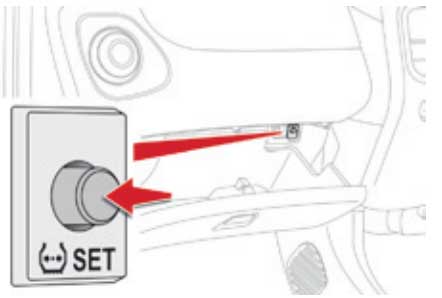
► Open the glove box.
► Press the reinitialisation button. (see above image)
► The flat tyre warning lamp flashes 3 times in the instrument panel when the reinitialisation is done.
► Wait a few minutes before switching off the ignition (ignition switch in the "ACC" or "LOCK" position, or "OFF" mode).
<h4>Please Note:</h4>
The system monitors the pressures in the four tyres, once the vehicle is moving.
It compares the information given by the four wheel speed sensors with reference values, which must be reinitialised every time the tyre pressures are adjusted or a wheel changed.
The system triggers an alert as soon as it detects a drop in the inflation pressure of one or more tyres.
Before resetting the system
Set all tyres on the Citroen C1 to the correct cold pressures first. Resetting the monitor with an incorrectly inflated tyre can store an unsafe reference value.

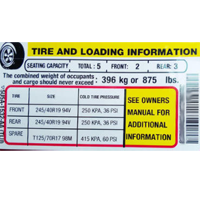
How tyre-pressure monitoring systems work
Direct TPMS uses a pressure sensor inside each wheel. It can usually identify a pressure loss before the vehicle moves and may show individual tyre pressures on the dashboard. Sensor replacement or relearning can sometimes require specialist equipment.
Indirect TPMS uses the ABS wheel-speed sensors to identify a tyre whose rolling circumference has changed. This system normally needs recalibrating after tyre pressures are adjusted, tyres are replaced or wheels are moved.
Dashboard wording and reset steps vary between trim levels and software versions. Follow the vehicle’s on-screen instructions and owner’s manual where they differ from the guidance above.